
What Is Bleach Mirrors High?
Bleach Mirrors High is a free to play Soul Reaper action game for Android, made by Bandai Namco Entertainment Inc. in close collaboration with BLEACH creator Tite Kubo. The story opens after the Thousand-Year Blood War, and you step in as the protagonist: a Soul Reaper whose journey begins in Karakura Town and grows from there. Familiar faces stand beside you, and a fresh cast designed by Kubo joins them, so the game feels both new and unmistakably BLEACH.
The heart of Bleach Mirrors High is the Soul Reaper you shape yourself. You choose the look, the style, and the Zanpakuto, and the result is a fighter that belongs to you rather than a fixed hero borrowed from the series. That personal hero then leads a squad of three into stylish, tactical battles, where quick decisions matter as much as raw power. If you have ever wanted to stand in the Soul Society as your own Soul Reaper, this is the game built for that wish.
Bleach Mirrors High APK on this site is the Android home for that game: what it is, how its combat works, who you will meet, how to install it safely, and how to get more from every battle. The guides are written from the official game description and from testing on real Android phones, in plain language, with no step skipped.
Main Features
Bleach Mirrors High packs its identity into a short list of systems that all pull in the same direction: your hero, your squad, and your cards. Nothing here is decoration. Every feature below changes how a battle plays or how the story feels.
Your own Soul Reaper. Deep avatar customization lets you shape appearance, style, and Zanpakuto. Two players can walk into the same story with heroes that look and feel nothing alike.
An original story after the war. The Thousand-Year Blood War is over, and a new chapter begins. New allies designed by Tite Kubo carry it, with Ichigo Kurosaki, Rukia Kuchiki, and other favorites fighting alongside them.
Voices from the anime cast. In game character voices come from the original Japanese anime cast, so a familiar line lands the way fans remember it.
Tactical card combat. Battles run on attack cards that combine into a wide range of combat possibilities, capped by the SOUL DRIVE combo that can turn a fight around in a single move.
How Combat Works
Combat in Bleach Mirrors High is fast, but it is not mindless. You command a squad of three characters into battle, and each fighter brings individual attacks and special techniques. The art of a fight is choosing well: which card to play now, which fighter to lean on, and when to hold back for the bigger move.
Attack cards are the core decision. Combining cards creates different combat possibilities, so the same squad can fight the same enemy two ways and win for two different reasons. Watch the enemy, read the cards in hand, and play the card that answers what is actually happening rather than the flashiest card on offer.
SOUL DRIVE is the payoff. When the moment is right, the whole squad combines into an explosive combo attack that can completely change the course of a battle. Save it for the turn where it matters most, because a SOUL DRIVE spent on a fight already won is a SOUL DRIVE missing when the next fight turns hard. New players should spend their first battles learning the rhythm: cards first, combos second, SOUL DRIVE last.
Characters You Will Meet
The roster of Bleach Mirrors High mixes two groups that complement each other. The first is the fighters fans already love: Ichigo Kurosaki, Rukia Kuchiki, Renji Abarai, Byakuya Kuchiki, Uryu Ishida, Yoruichi Shihoin, Toshiro Hitsugaya, and Grimmjow Jaegerjaquez, among others. They bring the voices, the techniques, and the history that make the world feel real.
The second group is brand new: rookie Soul Reapers designed by Tite Kubo for this game, including Shirin Migishima and Shirane Sanari at the front of the story. They are not background dressing. They carry the new storyline, they grow beside your hero, and their designs come from the same hand that drew the series. Meeting a new Soul Reaper here feels like meeting a new chapter, not a new skin.
Sosuke Aizen headlines the first limited time summon after launch, in a new version voiced by his original actor. That early arrival sets the tone for the game: major figures arrive quickly, and the story does not make you wait for its heavyweights.
Bleach Mirrors High Screenshots
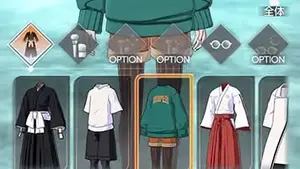
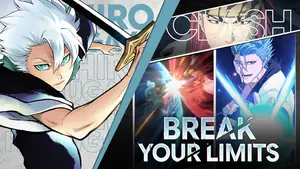
The screens below come from the game itself: the battle screen, the squad screen, attack card selection, a story scene, Soul Reaper customization, and a SOUL DRIVE finish. Swipe sideways on a phone to move through them, or use the arrows and dots. Every screen is shown landscape, as the game presents it.




How to Install Bleach Mirrors High on Android
Installing Bleach Mirrors High APK on an Android phone takes a few minutes and no extra tools. The steps below are the same ones used in testing, in the order that works.
Step 1: open the download page. Go to the download page on this site and read the file details table first.
Step 2: save the file. Use the download button after the short countdown. The file saves to the phone Downloads folder, and the phone will tell you when the save is done.
Step 3: allow this one install. When the phone asks about installing from this source, allow installs for the browser used for the download. That permission covers only that browser, and it can be switched off again right after the install.
Step 4: open the file and read. Tap the downloaded file in the notification or in the Downloads folder, read the permissions shown on screen, and confirm only if you are comfortable with them.
Step 5: open the game and shape your hero. Find the Bleach Mirrors High icon in the app drawer, open it, and follow the first launch screens. Shape your Soul Reaper before rushing into battle: the choices made here follow you through the whole story.
Safety and Verification
A game install is a trust decision, and Bleach Mirrors High deserves the same checks as any app from outside a store. This site lists a file only after verification.
Before installing anything, run the phone security scan on the downloaded file, read the permissions at install time, and check the file details against the APK details table on this site. A game has no reason to ask for contacts or messages, so question any permission that does not fit a game. After installing, the permission granted to the browser for this one install can be switched off again in Settings, which keeps the phone tidy for the next install.
Bleach Mirrors High itself is free to play with in-app purchases, including random item purchases, and the store description lists a monthly Premium Pass. Purchases are optional, and the game is built to be played without them. Set a spending rule before the first summon screen, not during it.
Troubleshooting
Most Bleach Mirrors High problems fall into a small set of causes, and the fixes below cover them in order. Work through them one at a time, and test the game after each step rather than changing five things at once.
The game will not open. Close it fully and reopen it, then restart the phone if the first try fails. A restart clears more stuck states than any settings change.
Battles lag or stutter. Close other apps, switch to a stable Wi-Fi connection, and lower the in game graphics setting one step. A phone that is hot from charging will also throttle, so let it cool before judging performance.
The download will not start. Check the download page file details table first, then check storage space and the browser download permission.
Progress looks lost. Do not uninstall in a panic. Reopen the game on the same connection and let it finish loading, then check the account or sign in route the game itself offers before assuming anything is gone.
Technical Details
Bleach Mirrors High is a mobile action game for Android and iOS, published by Bandai Namco Entertainment Inc. and free to play with in-app purchases. The Android build is the subject of this site, and the details table on this page carries the verified facts: app name, developer, category, price model, and file state. Where a fact has not been verified, the table says so instead of guessing.
The game is an online title: battles, story progress, and summons run through the game service, so a stable connection matters more than a top end phone. Storage needs grow with updates, so keep some free space beyond the install itself. If the phone is short on space, clear cached files from unused apps before installing a game update, because an update that runs out of room halfway is the most common cause of a corrupted install.
Old Versions
Old versions of Bleach Mirrors High are not listed on this site. The game is an online title, so older builds quickly stop matching the live service: story progress, summons, and events all run through the current build, and an old build can refuse to connect or lose access to current content. Playing the current build is the only route that keeps everything working.
If a guide elsewhere offers an old build, treat it with care. An old build of an online game is rarely the shortcut it looks like, and the safest path is the current build from the download page on this site.
Alternatives to Consider
If Bleach Mirrors High is not on your phone yet, or if its style is not your style, the wider BLEACH game shelf has other doors into the same world. Other BLEACH mobile games cover different kinds of combat, from straight action to team collection, and the anime itself is the obvious companion for the story. What Bleach Mirrors High alone offers is the combination: your own Soul Reaper, a new post war story designed with Tite Kubo, and card driven squad combat in one game.
For players who want the same feeling on a bigger screen, the game is built for phones first, so a tablet is the natural step up rather than a different game. Keep the phone build as the main account, and treat any other device as a second window into the same journey.
How to Update
Updating Bleach Mirrors High is simplest when it is boring: install the new build over the existing game without uninstalling first. That keeps progress, settings, and squad data in place, because uninstalling first is how progress gets lost. Before updating, check that the phone has free space and a stable connection, then let the update finish without switching apps halfway.
After an update, open the game once and let it finish loading before judging anything. New story chapters and events often arrive with an update, so read the in game notices once before jumping into battle. If the game looks different after an update, that is usually new content, not a fault, and the guides on this site cover the new systems as they arrive.